Cliptude: AI video generator for faceless YouTube videos Skip to Create Video
Cliptude Log in Create Video

Make YouTube videos on autopilot with AI agents: ChatGPT, Claude, Claude Code, Grok, Muse Code, Codex, OpenClaw and Hermes Agent.

Cliptude is an agentic AI video generator for faceless YouTube videos between 6 and 60 mins. It turns a prompt or script into a finished documentary-style video with voiceover, footage, animated maps, and data charts. AI agents plan, generate and direct every scene, and you review the plan before anything renders.

Create Video Watch a real job

Watch one real job, start to finish

Cliptude is an AI video generator for faceless YouTube videos. It turns a prompt or script into a finished documentary-style video with voiceover, footage, animated maps, and data charts.

Below, this job replays stage by stage: the script, the voice, the timeline and the render.

New video Ready

What is the video about?

Why scammers stay silent when you answer

Format
Avatar Video
Voice
Mike
Narration
6:12
Made with
Cliptude CLI

Real job f2ad0833 · 28 Oct 2026

Script and voice Mike · ElevenLabs

1,018 words

6:12 of 6:12 narrated

84 sentences

  1. You pick up the phone and say, "Hello."
  2. Nothing.
  3. One second.
  4. Two.
  5. Three.
  6. Then a click.
  7. Your stomach tightens a little.
  8. Was that a scam?
  9. Did you just give something away?
  10. Here is what is really going on, what is proven, and what is not.
  11. Start with a very common cause, and it is boring.
  12. Call centers use machines called predictive dialers.
  13. A dialer places calls ahead of time because it knows many calls will go unanswered.
  14. It bets that an agent will be free by the time someone picks up.
  15. Sometimes the bet fails.
  16. You answer, and no agent is ready.
  17. The result is dead air or a call that simply drops.
  18. The Federal Trade Commission calls dead air an unavoidable feature of these dialers.
  19. In the United Kingdom, the regulator Ofcom says silent calls are caused by automated calling systems called diallers, for example, when not enough call center agents are free.
  20. That is a very different picture from the one most online posts paint.
  21. There is a second cause.
  22. Some systems use something called answering machine detection.
  23. The dialer listens for a moment to decide whether a person or a machine picked up.
  24. While it decides, you hear nothing.
  25. The Federal Trade Commission described this dead air in its rulemaking record, along with the silence that happens while a dialer waits for an agent.
  26. So a short pause before someone speaks can be normal.
  27. Here is where the law comes in, and it surprises most people.
  28. On January twenty-ninth, two thousand and three, the Federal Trade Commission published a final rule to deal with abandoned calls and predictive dialers.
  29. It set up what is called a safe harbor.
  30. Think of it as a set of rules that, if a telemarketer follows them, keeps the company out of trouble.
  31. Under that safe harbor, a telemarketer may abandon no more than three percent of the calls that a person answers.
  32. And whenever no representative is free within two seconds after you finish saying hello, the system must play a recorded message.
  33. That message must name the seller and give a phone number.
  34. Unanswered calls must also ring for at least fifteen seconds, or four rings, before the dialer hangs up.
  35. So that leads to the big question: Is silence a sign of a scam?
  36. The honest answer is no, not by itself.
  37. Regulators document ordinary call center systems as a common cause.
  38. A silent call can also come from other technical problems.
  39. Anyone who tells you silence proves fraud is guessing.
  40. That brings us to the belief most people have heard.
  41. The mainstream advice online says that if you say hello, scammers record your voice, confirm your number is live, and sell it to every other scammer.
  42. Parts of that sound scary, and parts may even happen.
  43. But here is the problem.
  44. That claim is repeated everywhere and proven nowhere.
  45. The closest thing to evidence is the say yes story.
  46. On March twenty-seventh, two thousand and seventeen, the Federal Communications Commission issued a consumer alert.
  47. It relayed reports of callers asking, "Can you hear me?"
  48. in order to capture a recorded yes, and then using that recording to authorize unwanted charges.
  49. Notice what that alert actually is.
  50. It records an allegation and gives precautions.
  51. It does not show the scheme was widespread or verified, and it says nothing about the single word hello being dangerous.
  52. Here is where the real risk lives, not in the silence, but in what happens next.
  53. In two thousand and twenty-four, the Federal Trade Commission's Consumer Sentinel Data recorded more than six point four seven million reports across fraud, identity theft, and other consumer problems.
  54. Consumers reported more than twelve point five billion dollars lost to fraud, and thirty-eight percent of fraud reports said the person lost money.
  55. Those are reports, not a full count of every incident.
  56. Phone calls were the second most commonly reported way scammers made contact that year.
  57. People who reported interacting with scammers by phone had a median loss of fifteen hundred dollars.
  58. That number does not come from silent calls specifically.
  59. It comes from conversations where someone kept talking, trusted the voice, and sent money.
  60. The danger starts when you engage, not when you say hello.
  61. So what should you do?
  62. The plan is simple, and it does not depend on guessing who is calling.
  63. If you do not recognize the number, let it go to voicemail.
  64. The Federal Communications Commission's alert recommends this for unknown numbers.
  65. A real caller leaves a message.
  66. A dialer or a scammer usually does not.
  67. If you do answer and hear silence, you can say hello once, wait a few seconds, and hang up.
  68. Hanging up is a cautious choice and costs you nothing.
  69. Do not press buttons to be removed from a list, and do not stay on the line to see what happens.
  70. If a voice does come on and pushes you to act fast, to confirm a yes, or to share personal details, end the call.
  71. Then check your statements if you think you were targeted.
  72. Report fraud to the Federal Trade Commission.
  73. In the United Kingdom, Ofcom accepts reports of persistent, silent, or abandoned calls, and repeated violations can bring fines of up to two million pounds.
  74. That is exactly what the Scam Proof collection is built for.
  75. It is a set of four books and a printable pack for older adults and the families who help them, covering what to do when the phone rings and how to protect yourself and the people you love.
  76. It is sold on Gumroad for thirty-seven dollars.
  77. You can get it at ethancolex.gumroad.com/scamproof.
  78. Scan the QR code on screen or use the link in the description or the pinned comment.
  79. Here is the takeaway.
  80. A silent call is often just a dialer with no agent free.
  81. Saying hello is not proven to be dangerous.
  82. The real risk begins when you keep talking.
  83. So let unknown numbers go to voicemail, hang up on silence, and report what looks like fraud.
  84. If you want more practical, no-hype guides like this, subscribe.

Made through the Cliptude CLI, voiced by Cliptude.

Every shot, planned and placed

The plan set 80 beats and 37 graphics against the narration. Cliptude sourced, cut and timed them on this timeline, with 14 transitions and captions on every line.

Visuals
51
Graphics
35
Captions
193
Sound effects
21

6:12, cut.

Every frame on this timeline is the actual frame from the finished render, at that moment.

Render Queued

0% Composing 51 visuals, 35 graphics and 193 captions

Why Scammers Stay Silent When You Answer 6:12 · rendered in 4 min 28 s · 342 credits

Published, and watched

Videos made with Cliptude, as their creators' YouTube Studio reports them.

Creators signed up
7,500+
Videos rendered
1,900+
Formats
4
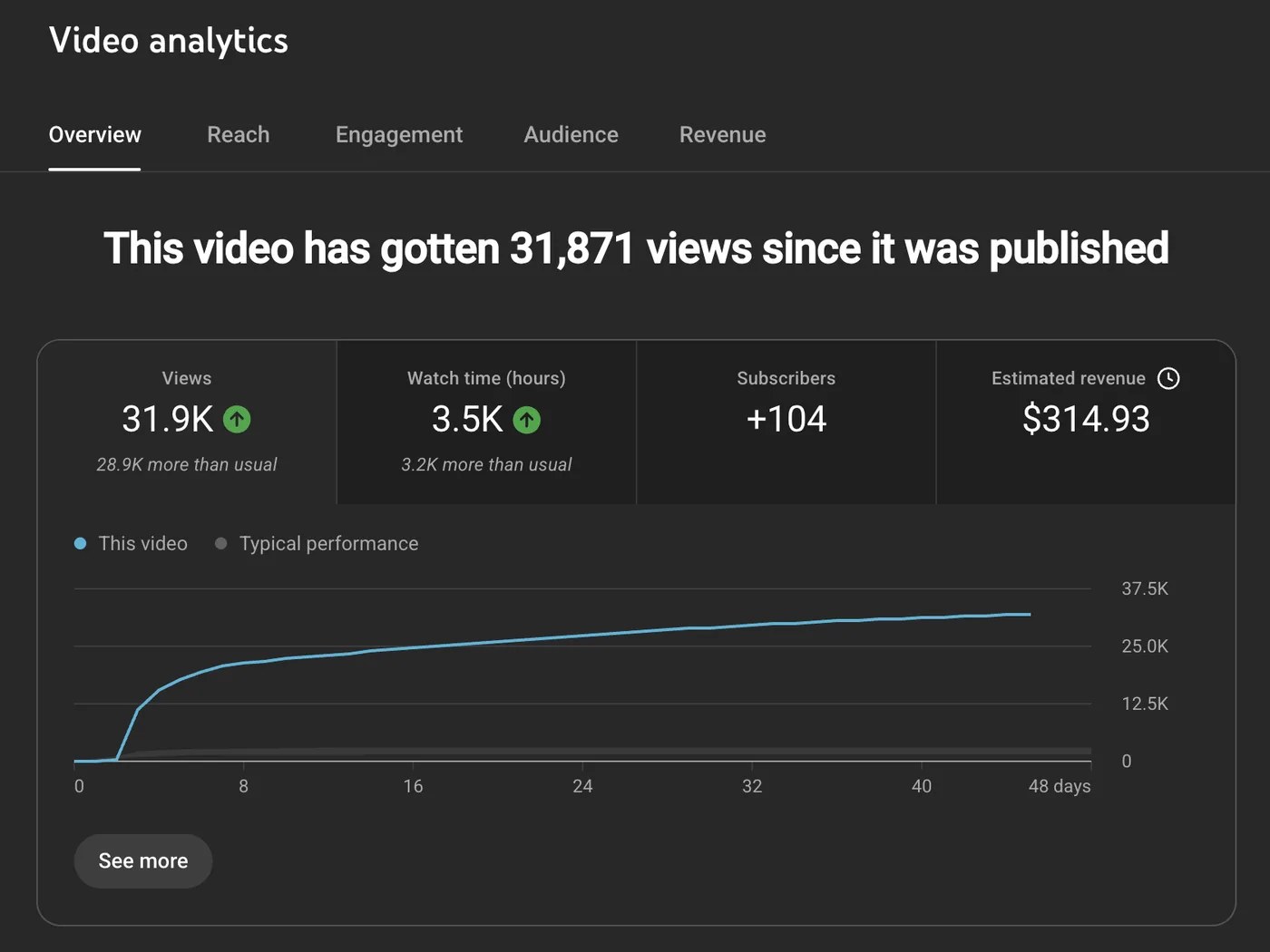
YouTube Studio: 31.9K views since publishing
31,871 views since publishing
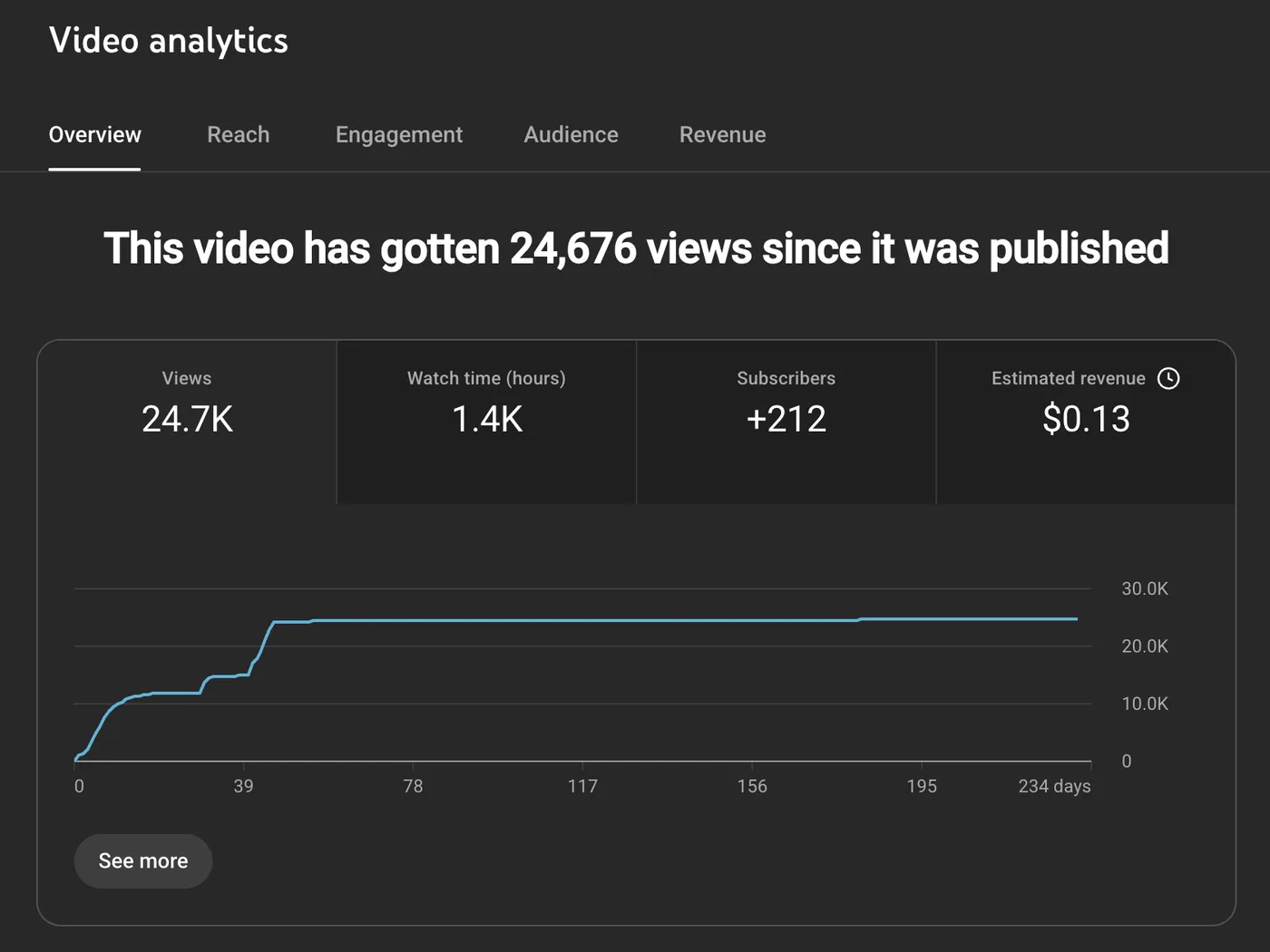
YouTube Studio: 24.7K views since publishing
24,676 views since publishing
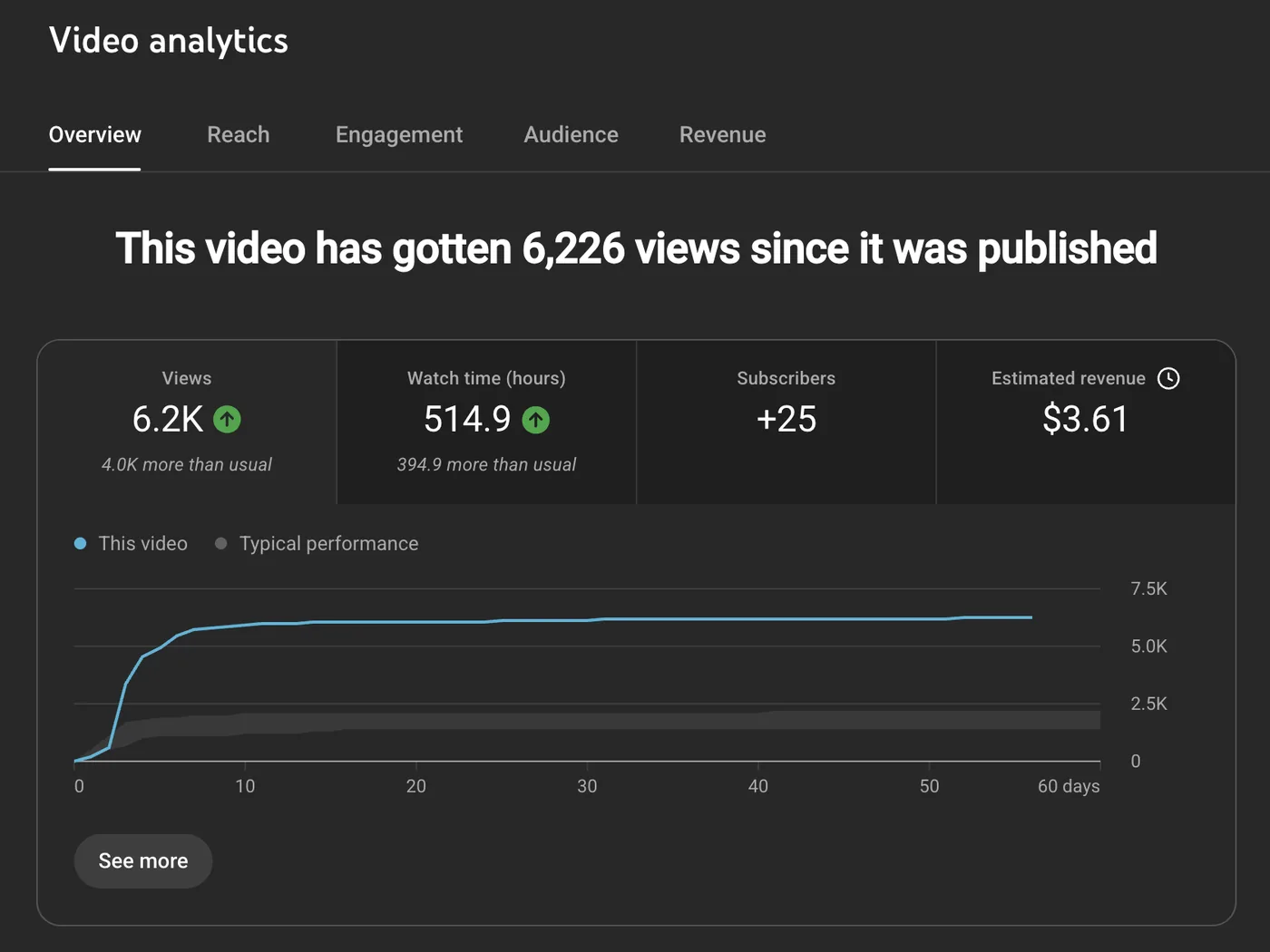
YouTube Studio: 6.2K views since publishing
6,226 views since publishing
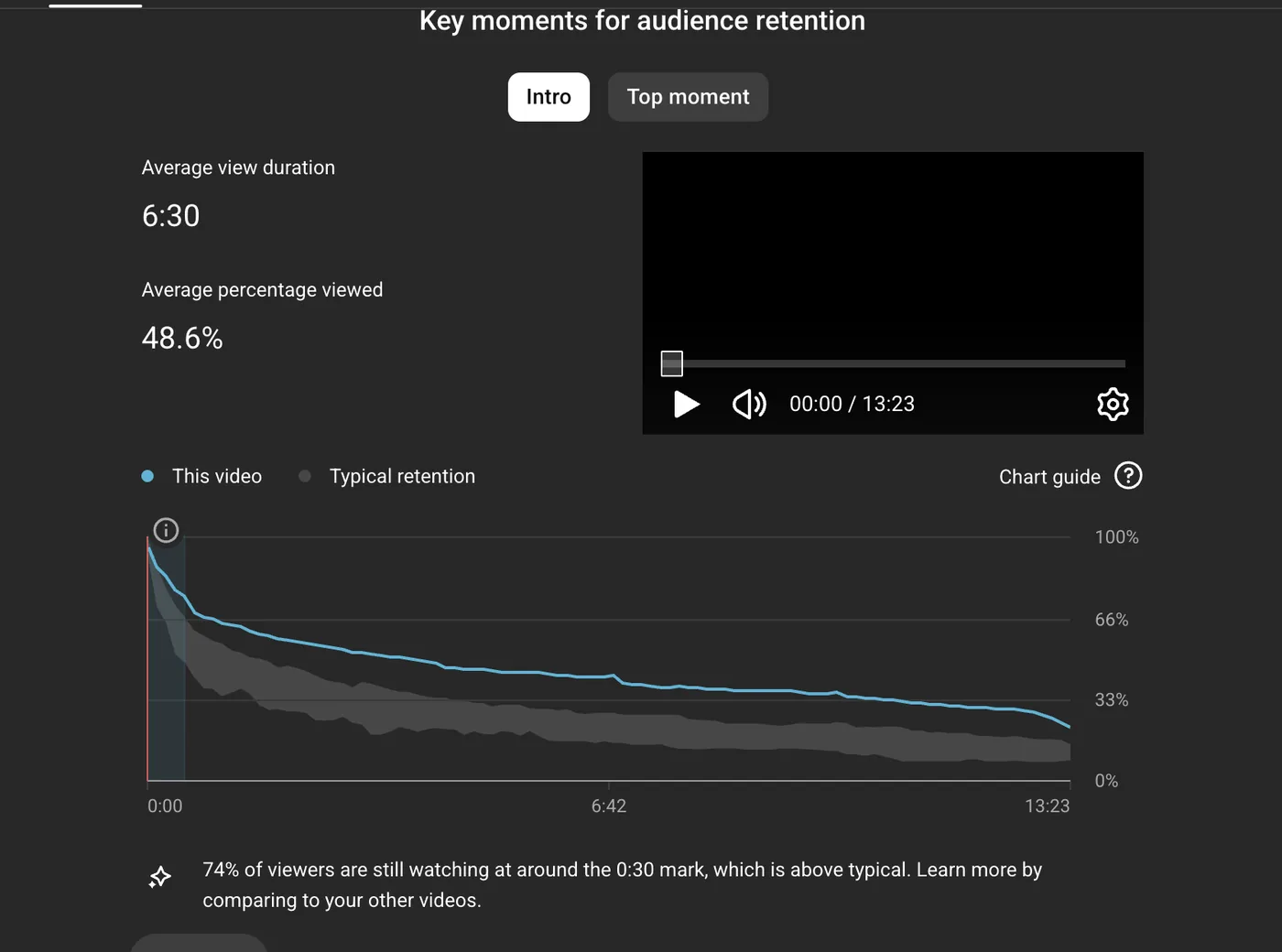
Audience retention: average view duration 6:30, 48.6% viewed
Average view duration 6:30 · 48.6% viewed
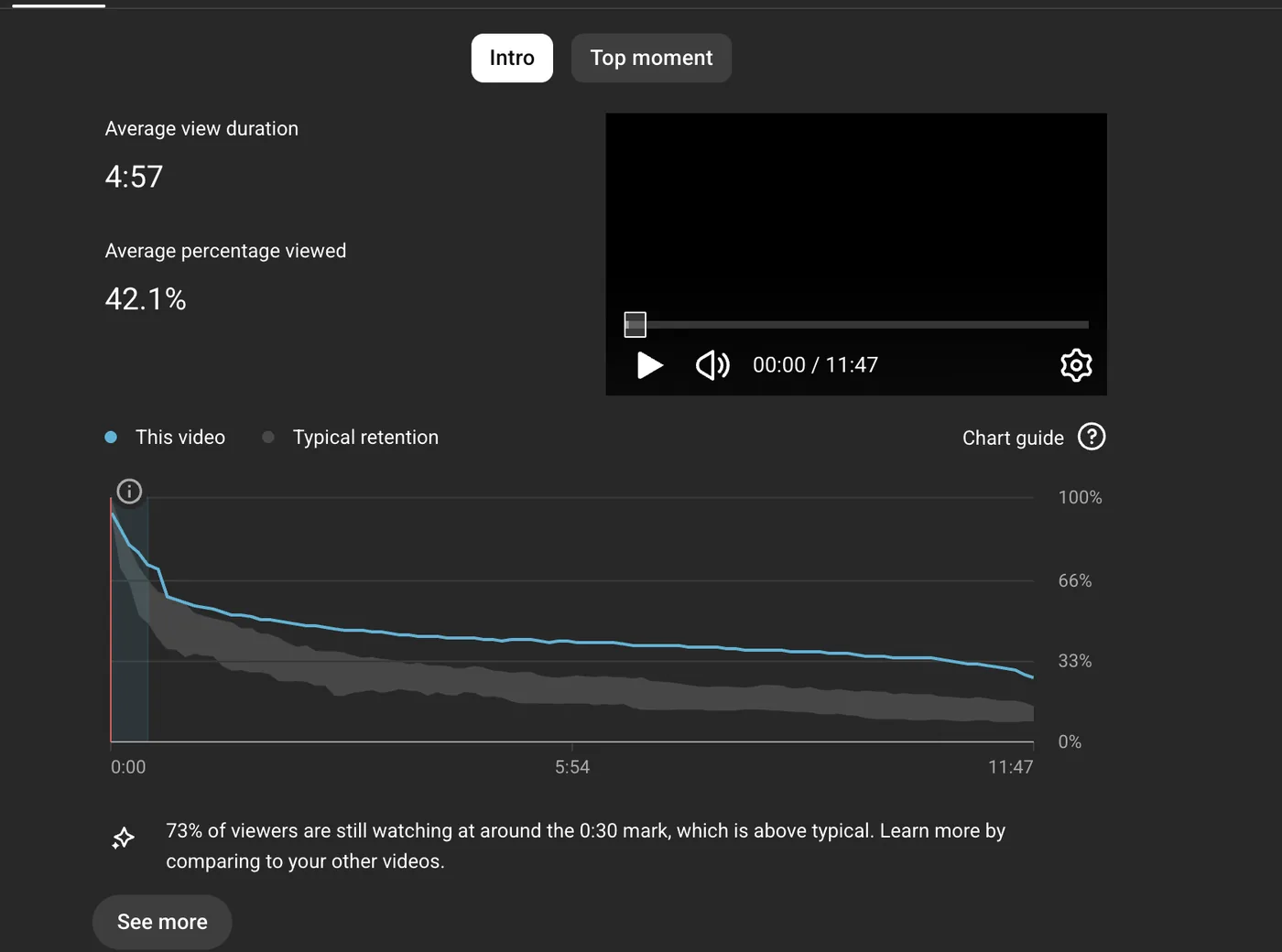
Audience retention: average view duration 4:57, 42.1% viewed
Average view duration 4:57 · 42.1% viewed

Comments from creators

Read all reviews or leave your own
  • Flying Life (Jeff) Cliptude user

    Developers always at hand

    The developers of Cliptude are always at hand to solve issues. Really enjoy using the system.
  • Blaxon Media Network Cliptude user

    Exceeded my expectations

    I've watched the video, and I must say, I'm really impressed with what you've done. This is exactly the kind of documentary I've been trying to create. The visuals, music, graphics, transitions and everything put together were really good. Honestly, the final result exceeded my expectations.
  • J YouTube creator

    A good and profitable system

    Video on B roll is good — it's a good and profitable system!
  • wedontfwhiroshima YouTube creator

    4 videos with thumbnails for $49

    My review on Cliptude is very positive, and I'm so optimistic about this project growing even bigger. There aren't many tools that offer this for YouTube long form especially at that price — you can make 4 videos with thumbnails for $49.
  • chris1122 YouTube creator

    Simple and fast from script to edit

    I just bought Cliptude for my YouTube channels, and I'm really impressed with it so far. It makes the whole video creation process simple and fast. The AI tools for scripts, voiceovers, and editing work surprisingly well — definitely happy with my purchase.
  • Marketing Agency Cliptude user

    Exceptional service

    I'm genuinely impressed by the level of support provided. The response was quick, and my issue was resolved smoothly. Exceptional service! Jordan you are the BEST support, I have ever seen.
  • Matvey Fedoseev YouTube creator

    All I bring is an idea

    I'm not a very creative person, but I have a strong technical background. I had no idea where to start with my YouTube channel or how to produce videos. Cliptude completely covered all my needs — all I have to bring is an idea, and it takes care of the rest.
  • Cliptude user YouTube creator

    Voiceover and visuals in sync

    Overall, I had a very good experience using this platform. The video quality was impressive, and the synchronization between the voiceover and visuals was seamless and engaging. Overall, this is a very promising tool with great potential.
  • henrik YouTube creator

    Couldn't tell AI from human

    Cliptude really helps me create good quality videos without spending a fortune, and you truly couldn't tell whether AI or a human made it. It has great animations and combines the clips for your video together really well. I would highly recommend it.
Message from a creatorMessage from a creatorMessage from a creatorMessage from a creatorMessage from a creatorMessage from a creatorMessage from a creator

Every format for YouTube

Credits per finished minute, charged after the render. The create screen shows the estimate for your length first.

Avatar Video

A lip-synced presenter with AI scenes, or a short avatar intro over the rest of the video.

35 credits/min

AI footage. An intro-only avatar uses the faceless documentary rate for its voice.

Create Video Avatar video guide

Faceless Documentary

Narrated long-form documentary with footage, maps, and charts. No host on camera.

22–40 credits/min

By voice: 22 credits per minute with your own voiceover, 32 with MiniMax and 40 with ElevenLabs. Caldera adds 5.

Create Video

Faceless Top 10

Ranked list videos paced from the last item to number one, with footage cut to the narration.

22–40 credits/min

By voice: 22 credits per minute with your own voiceover, 32 with MiniMax and 40 with ElevenLabs. Caldera adds 5.

Create Video

2D Animation

Full-bleed flat vector scenes. Keep them as stills, or animate each scene.

42–60, or ~138–164 for video

Stills are 42–60 credits/min on Cinder depending on the voice, 5 more on Caldera. Video animation is about 138 credits/min at 720p on Cinder.

Create Video 2D animation guide

Billing

Yearly billing Save 20%
  • Starter

    $15/mo billed yearly

    • 1,100 credits a month
    • About 50 minutes with your own voiceover
    • About 28 minutes with ElevenLabs voices
    Choose Starter
  • Lite

    $39/mo billed yearly

    • 2,850 credits a month
    • About 130 minutes with your own voiceover
    • About 71 minutes with ElevenLabs voices
    Choose Lite
  • Creator Most popular

    $95/mo billed yearly

    • 7,000 credits a month
    • About 318 minutes with your own voiceover
    • About 175 minutes with ElevenLabs voices
    Choose Creator
  • Pro

    $255/mo billed yearly

    • 19,000 credits a month
    • About 864 minutes with your own voiceover
    • About 475 minutes with ElevenLabs voices
    Choose Pro

Charged only after the video renders. Cancel anytime. A 1-hour render-only video: 900 credits, $12.00–$15.55. Compare all plans and pay-as-you-go credits.

Editing it yourself, or Cliptude
StepYourselfCliptude
ScriptResearch and write itResearched from a prompt, or paste yours
VoiceoverRecord it or hire a narratorAI voices, or your own voice clone
FootageSearch, license and cut clipsSourced and cut to the narration
Charts and mapsBuild each one by handGenerated from the numbers in your script
First cutDays to weeksHours

Help

Will the video look like generic AI?

Documentaries and Top 10s are cut from real footage, maps, and charts. 2D animation is drawn for the script. Avatar scenes are generated for that video. You approve the script, voice, and credit estimate before rendering, then adjust the cut in the timeline editor.

Can I use my own script or voice?

Yes. Paste a finished script or upload a voiceover. You still review the plan and the credit estimate before the video is rendered.

How are credits calculated?

The rate depends on the format and the voice. A faceless documentary or Top 10 on Cinder costs 22 credits per minute with your own voiceover, 32 with MiniMax and 40 with ElevenLabs, and Caldera adds 5. Avatar video with AI footage is 35. 2D animation with moving video is about 138. The create screen shows the estimate for your length before you start, and you are charged only after the video renders successfully.

Do you offer refunds?

Read the full details on our refund policy.

How does it find footage?

Documentary and Top 10 formats use clips from online sources plus licensed stock and public-domain footage, cut to the narration. Maps and charts are generated. 2D animation and avatar scenes are made for the script instead of pulled from a clip library.

You own everything

Full commercial rights, no watermark.

Cliptude exports a ZIP project with an FCP7 XML timeline for DaVinci Resolve, Premiere Pro, and Final Cut. The file includes separate audio tracks and the raw media, so you can fine-tune the edit outside Cliptude.

Where the picture comes from

  • Online sources. Documentary and Top 10 cut real clips that match the narration.
  • Stock. Licensed stock and public-domain footage fill the gaps.
  • Generated. Maps, charts, 2D animation and avatar scenes are made for the script.
  • Yours. Paste a finished script or upload your own narration.

Run it from your agent

The job above was made through the Cliptude CLI. Paste this into Claude Code, Claude, ChatGPT, Codex or any MCP agent:

Connect the Cliptude MCP server at https://mcp.cliptude.com/mcp and sign in. If you can't use MCP, install the CLI with `npm i -g @cliptude/cli` and run `cliptude auth login`.

Make a 10-minute YouTube documentary about [your topic]. Write the script, direct every scene with real footage, maps and charts, show me the plan before you build, then render.

MCP server, CLI and API

New video

Waiting for your prompt

You review the script, voice and credit estimate before anything renders. A faceless documentary is 22–40 credits a minute, and you sign in with Google first.